
How to Open Dyson Vacuum and Empty It in 5 Easy Steps
To open your Dyson vacuum and empty it in 5 easy steps, start by pressing the red button to detach the wand and accessories. This makes it easier to handle and gives you full access to the bin.
Next, lift the catch on the bin’s front and slide the bin off the vacuum body.
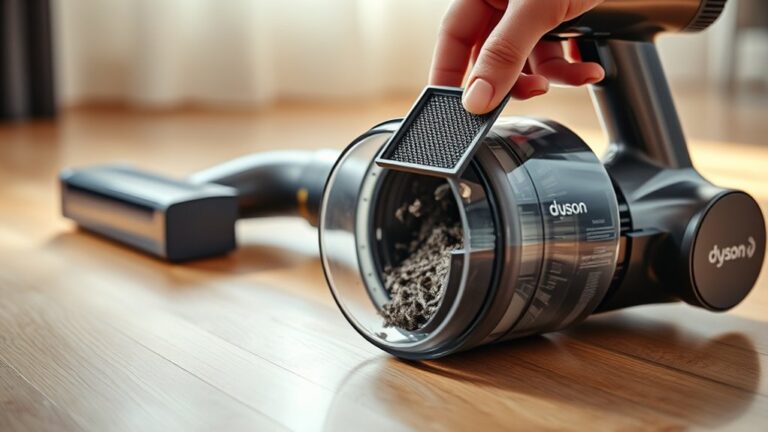
Now, empty the dirt into the trash. Be sure to wipe the bin carefully, but avoid using water as it can damage the vacuum. Instead, use a dry cloth to clean the bin thoroughly.
Finally, take a dry cloth and clean the vacuum body itself. Once everything is clean and dry, reassemble all parts securely.
Keep going to uncover tips for maintaining your vacuum’s performance and ensuring it runs smoothly for years to come!
Key Takeaways
- Press the red button on the wand to detach it from the main vacuum body.
- Lift the catch on the front of the bin to open it from underneath.
- Press the catch underneath the bin to slide and fully detach it from the vacuum.
- Empty the bin carefully into a trash can, avoiding any spills.
- Wipe the bin with a dry cloth and reattach it securely to the vacuum.
Press the Red Button to Detach Wand and Accessories

Before you can empty your Dyson vacuum, you need to detach the wand and accessories by pressing the red button. This red button is your key to releasing the wand from the main body.
To do this, hold the wand firmly and locate the red button on your Dyson V7 or V8 model. When you push this piece, the wand will release smoothly, allowing you to pull it away gently.
Make sure you don’t force it; pressing the red button fully lets the parts separate without damage. This simple step guarantees that the wand and any attached accessories come off easily, making the next steps of emptying your vacuum straightforward.
Open and Slide Off the Bin to Empty Contents

Once you’ve detached the wand, grab the catch on the front of the bin and lift it to open from underneath. This action releases the base of the bin, allowing the dirt and debris inside to fall out easily.
Before you empty the contents, make sure you’re holding the bin securely to avoid any spillage.
Next, press the catch underneath the bin to slide it off the vacuum body. This step is the same for both Dyson V7 and V8 models, so you don’t have to worry about different mechanisms.
Carefully slide the bin away from the vacuum to fully detach it, giving you better access for emptying. Once the bin is off, you can easily dispose of the contents into your trash.
Following these steps guarantees a smooth and mess-free emptying process every time.
Clean the Vacuum Bin Without Using Water

Although it might seem natural to wash the vacuum bin, you should never use water or liquids when cleaning it. Instead, grab a dry cloth and thoroughly wipe the inside of the bin to remove dust and debris.
This method effectively cleans without risking moisture damage to your vacuum’s components. Avoid spraying or applying any cleaning products inside the bin, as these can harm the vacuum’s delicate parts.
Make sure the bin is completely dry before reattaching it to maintain ideal suction performance. Regularly cleaning the bin with a dry cloth helps prevent dust buildup, ensuring your Dyson vacuum continues working efficiently.
Wipe the Vacuum Body to Remove Dust
After you’ve cleaned the vacuum bin with a dry cloth, it’s equally important to wipe down the vacuum body to keep dust from accumulating on its surface. Use a dry, lint-free cloth to gently clean the exterior, focusing on easily reachable areas like the handle, motor housing, and control panels.
Avoid using water, sprays, or any liquid cleaners on the body, as these can damage your Dyson vacuum. Always make sure the vacuum is turned off and unplugged before you begin wiping to prevent any accidental activation.
Regularly wiping the vacuum body not only keeps it looking good but also helps prevent dust buildup that could affect its performance. By incorporating this simple step into your cleaning routine, you’ll maintain your vacuum’s appearance and ensure it stays in top working condition for longer.
Reassemble Your Dyson Vacuum Securely
When you’re ready to put your Dyson vacuum back together, make sure to line up the parts carefully with their corresponding slots on the vacuum body. Focus on matching the red and gray components to ensure proper alignment and a secure fit.
Start by aligning the back of each part with its slot, then gently press it into place. You’ll hear a firm click when each piece clicks in securely. Don’t rush this step; a proper fit prevents leaks and maintains suction power.
Next, push down the bin or cover to close it fully, making sure it’s sealed tight. This prevents dust from escaping during use.
Before you finish, double-check that the bin and all accessories are firmly attached. Confirming everything is secure ensures your vacuum operates efficiently and safely.
Taking these steps will have your Dyson ready for its next cleaning session in no time.
Frequently Asked Questions
How to Open a Dyson Vacuum for Emptying?
You press the red button to detach accessories, hold and lift the catch on the bin’s front, then slide it off by pressing underneath.
This lets you open your Dyson vacuum and empty the bin easily. It’s pretty straightforward once you get the hang of it!
Why Can’t I Open My Dyson Bin Lid?
You can’t open your Dyson bin lid because the latch might be stuck or locked securely. Try pressing or holding the catch firmly.
Also, clear any debris blocking it. Just be careful not to force it, or you might cause damage.
How Do You Unlock a Dyson Vacuum?
Releasing your Dyson vacuum is a piece of cake—just press the red button to release the wand or accessories.
Hold and lift the catch on the bin’s front, and you’re good to go for cleaning or emptying. Easy, right?
How Do I Empty a Dyson Upright Vacuum?
You press the red button to remove the wand, then hold and lift the catch on the bin’s front.
Slide the bin off, hold it over trash, lift the catch to empty.
Finally, just reattach it securely and you’re good to go!
Conclusion
Emptying your Dyson vacuum regularly keeps it working at peak performance—did you know a clogged vacuum can lose up to 50% of its suction power?
By following these five easy steps, you’ll quickly detach, empty, clean, and reassemble your vacuum without hassle.
This simple routine not only extends your vacuum’s life but also guarantees your home stays spotless.
Keep it clean, and your Dyson will keep doing the hard work for you!
Regularly opening and emptying your Dyson vacuum is key to maintaining strong suction and overall efficiency. Plus, taking a few minutes to clean it properly means you’re protecting your investment and making sure your vacuum lasts longer. When your Dyson is clean and clear, it works smarter, picking up dirt and dust with ease. So, stick to this easy routine, and you’ll enjoy a powerful vacuum that keeps your home fresh and spotless every time.




4 Comments